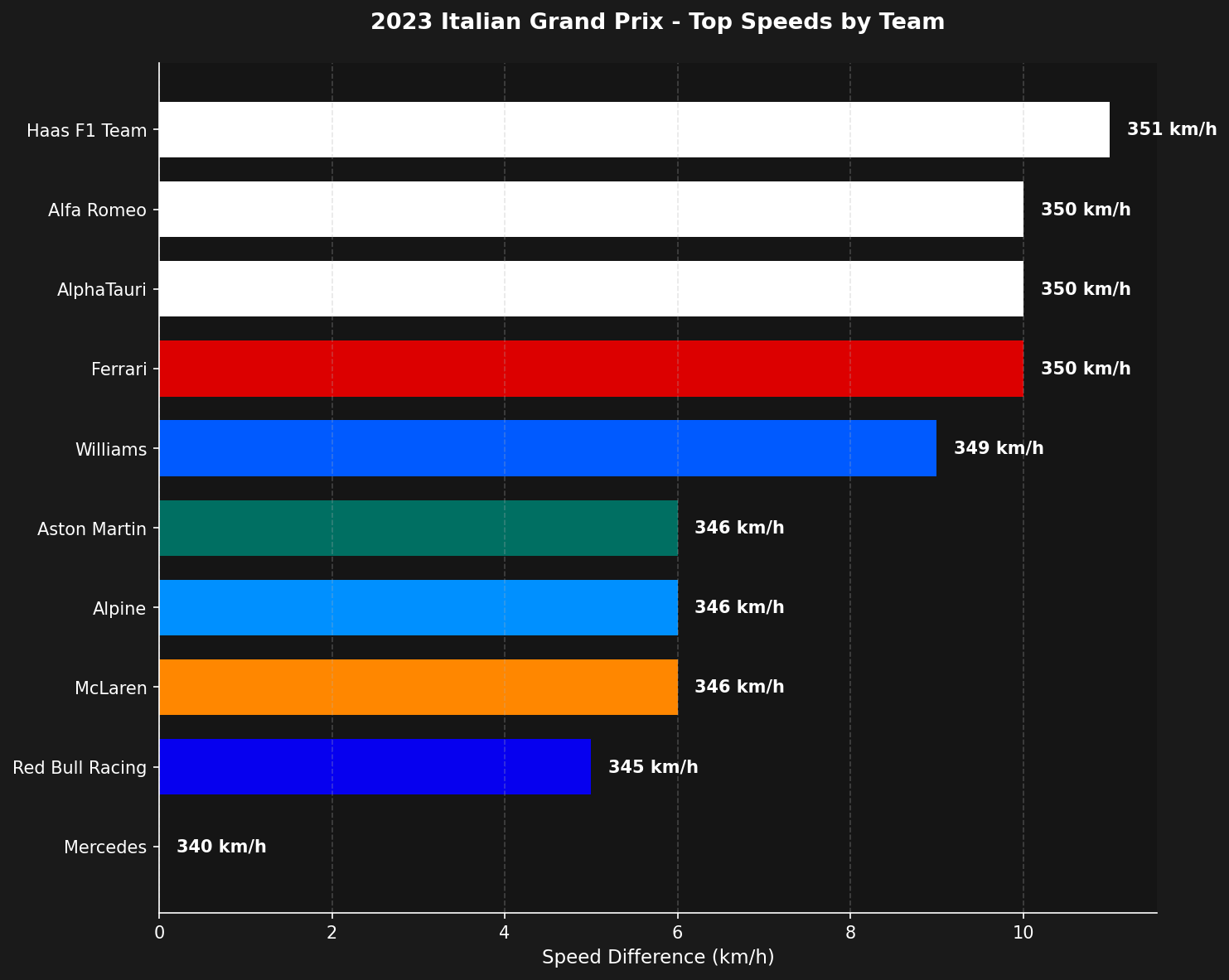
Speed trap data reveals which teams have the most powerful engines and efficient aerodynamics. By comparing maximum speeds across teams, you can identify performance advantages on straights and understand the power unit hierarchy. Top speeds by team comparison

Loading the session

We’ll analyze speed trap data from the 2023 Italian Grand Prix qualifying session, where top speeds are typically highest due to Monza’s low-downforce setup.
import tif1
import matplotlib.pyplot as plt
import pandas as pd

# Load qualifying session
session = tif1.get_session(2023, 'Italian Grand Prix', 'Q')

Finding the fastest speed trap

F1 tracks have multiple speed measurement points (I1, I2, ST, FL). Let’s identify which one recorded the highest speeds.
# Get speed columns
speed_columns = ['SpeedI1', 'SpeedI2', 'SpeedST', 'SpeedFL']
speed_data = session.laps[speed_columns]

# Find which speed trap had the highest readings
fastest_trap = speed_data.idxmax(axis=1).value_counts().index[0]
print(f"Fastest speed trap: {fastest_trap}")

Calculating maximum speeds by team

Group the data by team and find the maximum speed recorded for each.
# Prepare data with team information
team_speeds = session.laps[[fastest_trap, 'Team']].copy()

# Get maximum speed per team
max_speeds = team_speeds.groupby('Team')[fastest_trap].max().reset_index()
max_speeds.columns = ['Team', 'MaxSpeed']

# Sort by speed
max_speeds = max_speeds.sort_values('MaxSpeed', ascending=False)

# Calculate difference from slowest
max_speeds['Diff'] = max_speeds['MaxSpeed'] - max_speeds['MaxSpeed'].min()

Adding team colors

Use the plotting module to get official team colors for the visualization.
# Get team colors
team_colors = {}
for team in max_speeds['Team']:
    team_colors[team] = tif1.plotting.get_team_color(team, session=session)

max_speeds['Color'] = max_speeds['Team'].map(team_colors)

Creating the visualization

Build a horizontal bar chart showing the speed differences between teams.
fig, ax = plt.subplots(figsize=(10, 8))

# Create horizontal bars
bars = ax.barh(
    y=max_speeds['Team'],
    width=max_speeds['Diff'],
    color=max_speeds['Color'],
    height=0.7
)

# Add speed labels
for i, (speed, diff) in enumerate(zip(max_speeds['MaxSpeed'], max_speeds['Diff'])):
    ax.text(
        diff + 0.2,
        i,
        f"{int(speed)} km/h",
        va='center',
        fontsize=10,
        fontweight='bold'
    )

# Styling
ax.set_xlabel('Speed Difference (km/h)', fontsize=11)
ax.set_title(
    f"{session.event.year} {session.event['EventName']} - Top Speeds by Team",
    fontsize=13,
    fontweight='bold',
    pad=20
)
ax.invert_yaxis()
ax.spines['top'].set_visible(False)
ax.spines['right'].set_visible(False)

plt.tight_layout()
plt.show()

Interpreting the results

When analyzing top speed data, consider:
  • Power unit performance: Teams with the same engine supplier often show similar top speeds
  • Aerodynamic efficiency: Lower drag setups achieve higher speeds but may sacrifice cornering performance
  • Track-specific setups: Monza and Spa typically show the highest speeds due to low-downforce configurations
  • DRS effect: Ensure you’re comparing like-for-like (DRS enabled or disabled)

Complete example

import tif1
import matplotlib.pyplot as plt

# Setup
tif1.plotting.setup_mpl(color_scheme='fastf1')

# Load session
session = tif1.get_session(2023, 'Italian Grand Prix', 'Q')

# Find fastest speed trap
speed_columns = ['SpeedI1', 'SpeedI2', 'SpeedST', 'SpeedFL']
speed_data = session.laps[speed_columns]
fastest_trap = speed_data.idxmax(axis=1).value_counts().index[0]

# Calculate max speeds by team
team_speeds = session.laps[[fastest_trap, 'Team']].copy()
max_speeds = team_speeds.groupby('Team')[fastest_trap].max().reset_index()
max_speeds.columns = ['Team', 'MaxSpeed']
max_speeds = max_speeds.sort_values('MaxSpeed', ascending=False)
max_speeds['Diff'] = max_speeds['MaxSpeed'] - max_speeds['MaxSpeed'].min()

# Get team colors
team_colors = {team: tif1.plotting.get_team_color(team, session=session)
               for team in max_speeds['Team']}
max_speeds['Color'] = max_speeds['Team'].map(team_colors)

# Plot
fig, ax = plt.subplots(figsize=(10, 8))
ax.barh(
    y=max_speeds['Team'],
    width=max_speeds['Diff'],
    color=max_speeds['Color'],
    height=0.7
)

# Add labels
for i, (speed, diff) in enumerate(zip(max_speeds['MaxSpeed'], max_speeds['Diff'])):
    ax.text(diff + 0.2, i, f"{int(speed)} km/h", va='center',
            fontsize=10, fontweight='bold')

ax.set_xlabel('Speed Difference (km/h)', fontsize=11)
ax.set_title(
    f"{session.event.year} {session.event['EventName']} - Top Speeds by Team",
    fontsize=13, fontweight='bold', pad=20
)
ax.invert_yaxis()
ax.spines['top'].set_visible(False)
ax.spines['right'].set_visible(False)

plt.tight_layout()
plt.show()
Next steps

  • Compare speed trap data across different tracks to see setup variations
  • Analyze the relationship between top speed and lap time
  • Explore telemetry comparison for detailed speed profiles
Last modified on March 6, 2026