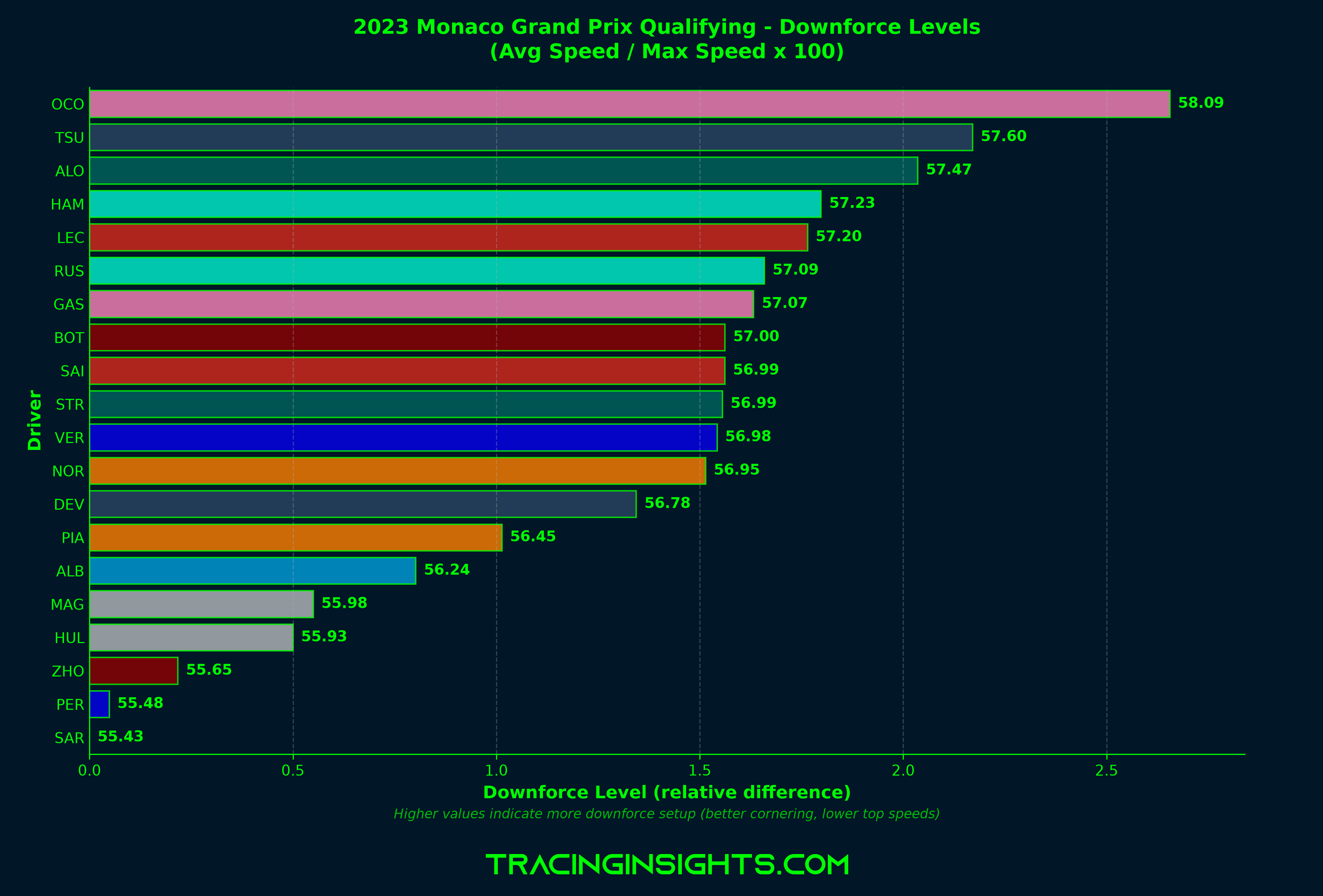
Understanding downforce levels helps reveal car setup philosophy. By comparing average lap speed to maximum speed, we can estimate whether teams are running high-downforce (better cornering) or low-downforce (higher top speeds) configurations. Downforce levels comparison across drivers

The concept

The downforce metric is calculated as:
Downforce Level = (Average Speed / Maximum Speed) × 100
  • Higher values indicate more downforce: better cornering speeds but lower top speeds
  • Lower values indicate less downforce: higher top speeds but slower through corners
This is particularly revealing on tracks like Monaco (high downforce) vs Monza (low downforce).

Loading the session

We’ll analyze qualifying from the 2023 Monaco Grand Prix, a track where downforce is critical.
import tif1
import matplotlib.pyplot as plt

# Setup plotting
tif1.plotting.setup_mpl(color_scheme='fastf1')

# Load qualifying session
session = tif1.get_session(2023, 'Monaco Grand Prix', 'Q')

Calculating downforce metrics

For each driver, we calculate their average speed and maximum speed from their fastest lap.
drivers = session.laps['Driver'].unique()
downforce_data = []

for driver in drivers:
    try:
        # Get fastest lap
        fastest_lap = session.laps.pick_drivers(driver).pick_fastest()
        telemetry = fastest_lap.get_car_data().add_distance()

        # Calculate speeds
        max_speed = telemetry['Speed'].max()
        lap_time = fastest_lap['LapTime'].total_seconds()
        circuit_length = telemetry['Distance'].max()
        avg_speed = (circuit_length / lap_time) * 3.6  # Convert to km/h

        # Downforce metric
        downforce_metric = (avg_speed / max_speed) * 100

        downforce_data.append({
            'Driver': driver,
            'Team': fastest_lap['Team'],
            'Metric': downforce_metric
        })
    except Exception:
        continue

# Sort by metric (highest downforce first)
downforce_data.sort(key=lambda x: x['Metric'], reverse=True)

Visualizing the results

Create a horizontal bar chart with team colors. To make the differences more apparent, we map the values to the minimum metric, showing relative differences rather than absolute values.
# Sort by downforce metric
downforce_data.sort(key=lambda x: x['Metric'], reverse=True)

# Map to minimum value to make differences more apparent
min_metric = min(d['Metric'] for d in downforce_data)
for d in downforce_data:
    d['MetricDiff'] = d['Metric'] - min_metric

fig, ax = plt.subplots(figsize=(12, 8))

drivers_list = [d['Driver'] for d in downforce_data]
metrics_diff = [d['MetricDiff'] for d in downforce_data]
metrics_actual = [d['Metric'] for d in downforce_data]
colors = [tif1.plotting.get_team_color(d['Team'], session) for d in downforce_data]

# Create bars with relative differences
bars = ax.barh(drivers_list, metrics_diff, color=colors, alpha=0.8,
               edgecolor='white', linewidth=1)

# Add actual value labels
for i, (driver, metric) in enumerate(zip(drivers_list, metrics_actual)):
    ax.text(metrics_diff[i] + 0.02, i, f'{metric:.2f}',
            va='center', fontsize=10, fontweight='bold')

# Styling
ax.set_xlabel('Downforce Level (relative difference)', fontsize=12, fontweight='bold')
ax.set_ylabel('Driver', fontsize=12, fontweight='bold')
ax.set_title('Monaco GP Qualifying - Downforce Levels',
             fontsize=14, fontweight='bold')
ax.invert_yaxis()
ax.grid(axis='x', alpha=0.3, linestyle='--')
ax.set_xlim(left=0)

plt.tight_layout()
plt.show()
The chart displays relative differences (bar lengths) while showing actual metric values (labels), making it easier to spot setup variations between drivers.

Interpreting the results

When analyzing downforce levels, consider:
  • Track characteristics: Monaco requires high downforce; Monza requires low downforce
  • Team philosophy: Some teams prioritize qualifying pace (more downforce) vs race pace (less drag)
  • Weather conditions: Wet conditions often favor higher downforce setups
  • Tire strategy: High downforce can increase tire wear in races

Comparing teams

You can also aggregate by team to see constructor-level setup choices:
# Group by team and take the best driver from each
team_data = {}
for d in downforce_data:
    team = d['Team']
    if team not in team_data or d['Metric'] > team_data[team]['Metric']:
        team_data[team] = d

# Sort teams
teams_sorted = sorted(team_data.values(), key=lambda x: x['Metric'], reverse=True)

# Map to minimum for better visualization
min_team_metric = min(t['Metric'] for t in teams_sorted)
for t in teams_sorted:
    t['MetricDiff'] = t['Metric'] - min_team_metric

# Plot team comparison
fig, ax = plt.subplots(figsize=(10, 6))
teams = [t['Team'] for t in teams_sorted]
metrics_diff = [t['MetricDiff'] for t in teams_sorted]
metrics_actual = [t['Metric'] for t in teams_sorted]
colors = [tif1.plotting.get_team_color(t['Team'], session) for t in teams_sorted]

ax.barh(teams, metrics_diff, color=colors, alpha=0.8, edgecolor='white', linewidth=1)

# Add actual value labels
for i, metric in enumerate(metrics_actual):
    ax.text(metrics_diff[i] + 0.02, i, f'{metric:.2f}', va='center', fontsize=10, fontweight='bold')

ax.set_xlabel('Downforce Level (relative difference)')
ax.set_title('Team Downforce Comparison')
ax.invert_yaxis()
ax.grid(axis='x', alpha=0.3)
ax.set_xlim(left=0)

plt.tight_layout()
plt.show()

Complete example

import tif1
import matplotlib.pyplot as plt

# Setup
tif1.plotting.setup_mpl(color_scheme='fastf1')
session = tif1.get_session(2023, 'Monaco Grand Prix', 'Q')

# Calculate metrics
drivers = session.laps['Driver'].unique()
downforce_data = []

for driver in drivers:
    try:
        fastest_lap = session.laps.pick_drivers(driver).pick_fastest()
        telemetry = fastest_lap.get_car_data().add_distance()

        max_speed = telemetry['Speed'].max()
        lap_time = fastest_lap['LapTime'].total_seconds()
        circuit_length = telemetry['Distance'].max()
        avg_speed = (circuit_length / lap_time) * 3.6

        downforce_metric = (avg_speed / max_speed) * 100

        downforce_data.append({
            'Driver': driver,
            'Team': fastest_lap['Team'],
            'Metric': downforce_metric
        })
    except Exception:
        continue

downforce_data.sort(key=lambda x: x['Metric'], reverse=True)

# Map to minimum value to make differences more apparent
min_metric = min(d['Metric'] for d in downforce_data)
for d in downforce_data:
    d['MetricDiff'] = d['Metric'] - min_metric

# Plot
fig, ax = plt.subplots(figsize=(12, 8))
drivers_list = [d['Driver'] for d in downforce_data]
metrics_diff = [d['MetricDiff'] for d in downforce_data]
metrics_actual = [d['Metric'] for d in downforce_data]
colors = [tif1.plotting.get_team_color(d['Team'], session) for d in downforce_data]

ax.barh(drivers_list, metrics_diff, color=colors, alpha=0.8, edgecolor='white', linewidth=1)

for i, (driver, metric) in enumerate(zip(drivers_list, metrics_actual)):
    ax.text(metrics_diff[i] + 0.02, i, f'{metric:.2f}', va='center', fontsize=10, fontweight='bold')

ax.set_xlabel('Downforce Level (relative difference)', fontsize=12, fontweight='bold')
ax.set_ylabel('Driver', fontsize=12, fontweight='bold')
ax.set_title('Monaco GP Qualifying - Downforce Levels', fontsize=14, fontweight='bold')
ax.invert_yaxis()
ax.grid(axis='x', alpha=0.3, linestyle='--')
ax.set_xlim(left=0)

plt.tight_layout()
plt.show()

Next steps

  • Compare downforce levels across different tracks (Monaco vs Monza)
  • Analyze how downforce affects tire degradation in race stints
  • Correlate downforce levels with sector times to identify setup trade-offs
  • Explore the relationship between downforce and weather conditions
Last modified on March 6, 2026