This tutorial shows you how to create a professional qualifying results chart that displays all drivers’ performance relative to pole position, with team colors for easy identification.
Overview
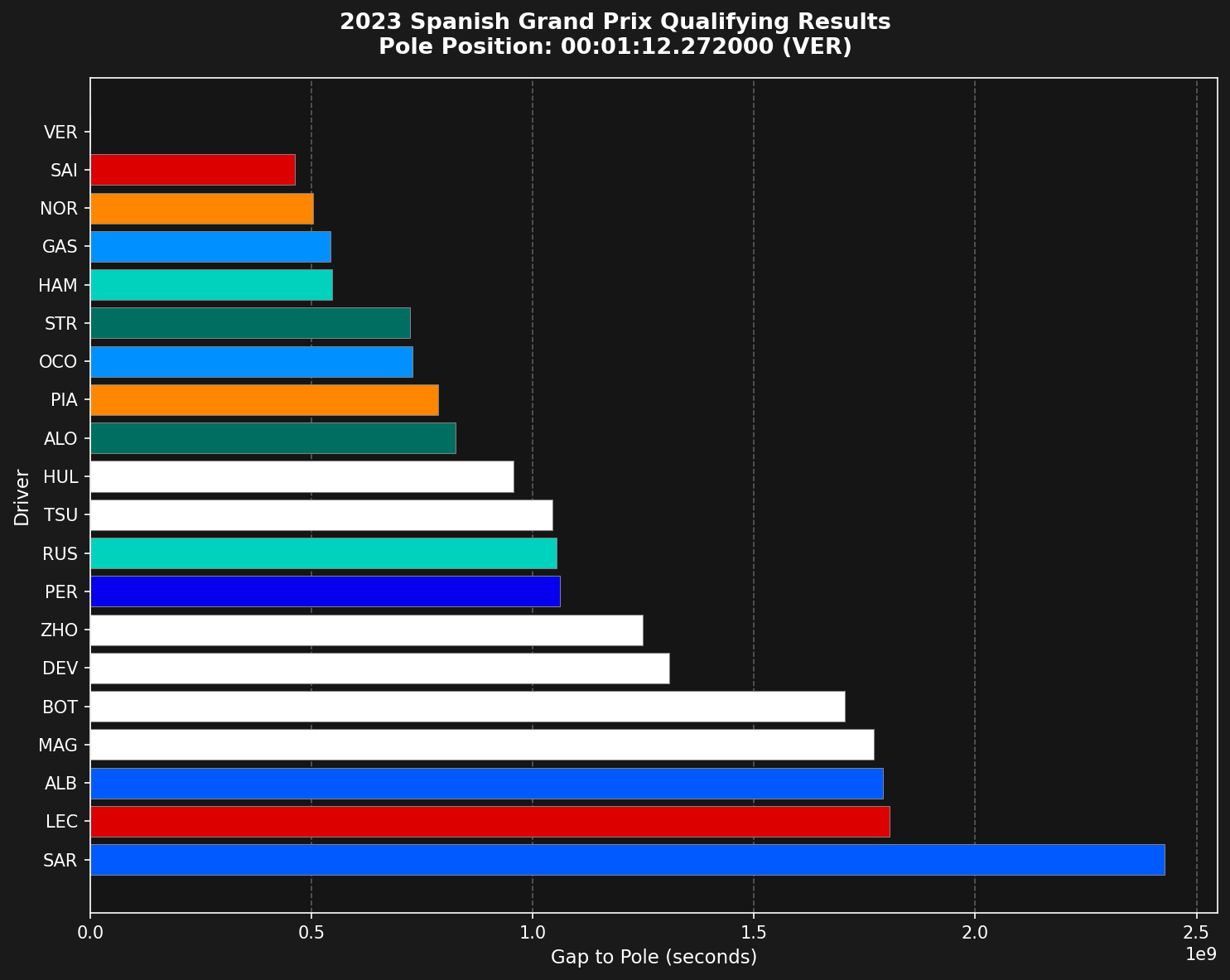
The qualifying results chart is a horizontal bar chart that shows:
- Each driver’s position in qualifying order (fastest at top)
- Gap to pole position in seconds
- Team colors for visual identification
- Clear pole position reference
Loading the data
First, load the qualifying session and get all drivers’ fastest laps.
import tif1
import matplotlib.pyplot as plt
import pandas as pd

# Setup plotting with timedelta support
tif1.plotting.setup_mpl(mpl_timedelta_support=True, color_scheme='fastf1')

# Load qualifying session
session = tif1.get_session(2023, 'Spanish Grand Prix', 'Q')
laps = session.laps

# Get all unique drivers
drivers = pd.unique(laps['Driver'])
Getting fastest laps per driver
Extract each driver’s fastest lap from the session.
# Get fastest lap for each driver
list_fastest_laps = []
for drv in drivers:
    drv_laps = laps[laps['Driver'] == drv]
    if len(drv_laps) > 0:
        fastest_idx = drv_laps['LapTime'].idxmin()
        list_fastest_laps.append(drv_laps.loc[fastest_idx])

# Create DataFrame and sort by lap time
fastest_laps = pd.DataFrame(list_fastest_laps) \
    .sort_values(by='LapTime') \
    .reset_index(drop=True)
Calculating gap to pole
The chart shows time differences from pole position, not absolute lap times.
# Calculate time delta from pole
pole_lap_time = fastest_laps['LapTime'].iloc[0]
fastest_laps['LapTimeDelta'] = fastest_laps['LapTime'] - pole_lap_time

# Preview the results
print(fastest_laps[['Driver', 'LapTime', 'LapTimeDelta']].head(10))
Getting team colors
Use tif1’s built-in color mapping to get official team colors.
# Get team colors for each driver
team_colors = []
for _, lap in fastest_laps.iterrows():
    color = tif1.plotting.get_team_color(team=lap['Team'], session=session)
    team_colors.append(color)
Creating the visualization
Build a horizontal bar chart with proper formatting.
# Create the plot
fig, ax = plt.subplots(figsize=(10, 8))
ax.barh(fastest_laps.index, fastest_laps['LapTimeDelta'],
        color=team_colors, edgecolor='grey', linewidth=0.5)

# Set driver labels
ax.set_yticks(fastest_laps.index)
ax.set_yticklabels(fastest_laps['Driver'])

# Show fastest at the top
ax.invert_yaxis()

# Add grid lines
ax.set_axisbelow(True)
ax.xaxis.grid(True, which='major', linestyle='--',
              color='white', alpha=0.3, zorder=-1000)

# Labels
ax.set_xlabel('Gap to Pole (seconds)', fontsize=11)
ax.set_ylabel('Driver', fontsize=11)

# Format title
pole_driver = fastest_laps['Driver'].iloc[0]
pole_time_str = str(pole_lap_time).split()[-1]

plt.suptitle(f"2023 Spanish Grand Prix Qualifying Results\n"
             f"Pole Position: {pole_time_str} ({pole_driver})",
             fontsize=13, fontweight='bold')

plt.tight_layout()
plt.show()
Complete example
Here’s the full code in one place:
import tif1
import matplotlib.pyplot as plt
import pandas as pd

# Setup plotting
tif1.plotting.setup_mpl(mpl_timedelta_support=True, color_scheme='fastf1')

# Load qualifying session
session = tif1.get_session(2023, 'Spanish Grand Prix', 'Q')
laps = session.laps

# Get all unique drivers
drivers = pd.unique(laps['Driver'])

# Get fastest lap for each driver
list_fastest_laps = []
for drv in drivers:
    drv_laps = laps[laps['Driver'] == drv]
    if len(drv_laps) > 0:
        fastest_idx = drv_laps['LapTime'].idxmin()
        list_fastest_laps.append(drv_laps.loc[fastest_idx])

# Create DataFrame and sort by lap time
fastest_laps = pd.DataFrame(list_fastest_laps) \
    .sort_values(by='LapTime') \
    .reset_index(drop=True)

# Calculate time delta from pole
pole_lap_time = fastest_laps['LapTime'].iloc[0]
fastest_laps['LapTimeDelta'] = fastest_laps['LapTime'] - pole_lap_time

# Get team colors
team_colors = []
for _, lap in fastest_laps.iterrows():
    color = tif1.plotting.get_team_color(team=lap['Team'], session=session)
    team_colors.append(color)

# Create the plot
fig, ax = plt.subplots(figsize=(10, 8))
ax.barh(fastest_laps.index, fastest_laps['LapTimeDelta'],
        color=team_colors, edgecolor='grey', linewidth=0.5)

ax.set_yticks(fastest_laps.index)
ax.set_yticklabels(fastest_laps['Driver'])
ax.invert_yaxis()

ax.set_axisbelow(True)
ax.xaxis.grid(True, which='major', linestyle='--',
              color='white', alpha=0.3, zorder=-1000)

ax.set_xlabel('Gap to Pole (seconds)', fontsize=11)
ax.set_ylabel('Driver', fontsize=11)

pole_driver = fastest_laps['Driver'].iloc[0]
pole_time_str = str(pole_lap_time).split()[-1]

plt.suptitle(f"2023 Spanish Grand Prix Qualifying Results\n"
             f"Pole Position: {pole_time_str} ({pole_driver})",
             fontsize=13, fontweight='bold')

plt.tight_layout()
plt.show()
Customization options
Enhance the chart with additional features:
# Show only top 10
fastest_laps_top10 = fastest_laps.head(10)

# Add value labels on bars
for idx, (i, row) in enumerate(fastest_laps.iterrows()):
    if row['LapTimeDelta'].total_seconds() > 0:
        ax.text(row['LapTimeDelta'].total_seconds(), idx,
                f"+{row['LapTimeDelta'].total_seconds():.3f}s",
                va='center', ha='left', fontsize=9, color='white')

# Highlight specific drivers
highlight_driver = 'HAM'
for idx, row in fastest_laps.iterrows():
    if row['Driver'] == highlight_driver:
        ax.get_children()[idx].set_edgecolor('yellow')
        ax.get_children()[idx].set_linewidth(2)
Comparing multiple sessions
Create side-by-side comparisons of different qualifying sessions:
fig, (ax1, ax2) = plt.subplots(1, 2, figsize=(16, 8))

# Load two different qualifying sessions
session1 = tif1.get_session(2023, 'Spanish Grand Prix', 'Q')
session2 = tif1.get_session(2023, 'Monaco Grand Prix', 'Q')

# Plot both (reuse the plotting code for each axis)
# ... plotting code for ax1 and ax2 ...

plt.tight_layout()
plt.show()
Exporting the chart
Save the visualization for reports or presentations:
# Save as high-resolution PNG
plt.savefig('qualifying_results.png', dpi=300, bbox_inches='tight',
            facecolor='#1a1a1a')

# Save as vector format for publications
plt.savefig('qualifying_results.svg', bbox_inches='tight')
Key insights from the chart
This visualization helps you quickly identify:
- Pole position and front row starters
- Gaps between drivers and teams
- Team performance clusters
- Drivers who significantly outperformed or underperformed
- Q1/Q2 elimination cutoffs (positions 16-20, 11-15)
Summary
The qualifying results chart provides an intuitive way to understand the competitive order and performance gaps in qualifying. By using team colors and showing gaps to pole, it makes it easy to spot patterns and compare driver performance at a glance.
Related Pages
Qualifying Analysis
Deep dive into qualifying data
Driver Lap Times
Analyze lap time progression
Data Visualization
More visualization techniques
Plotting API
Plotting functions reference
Last modified on March 6, 2026

