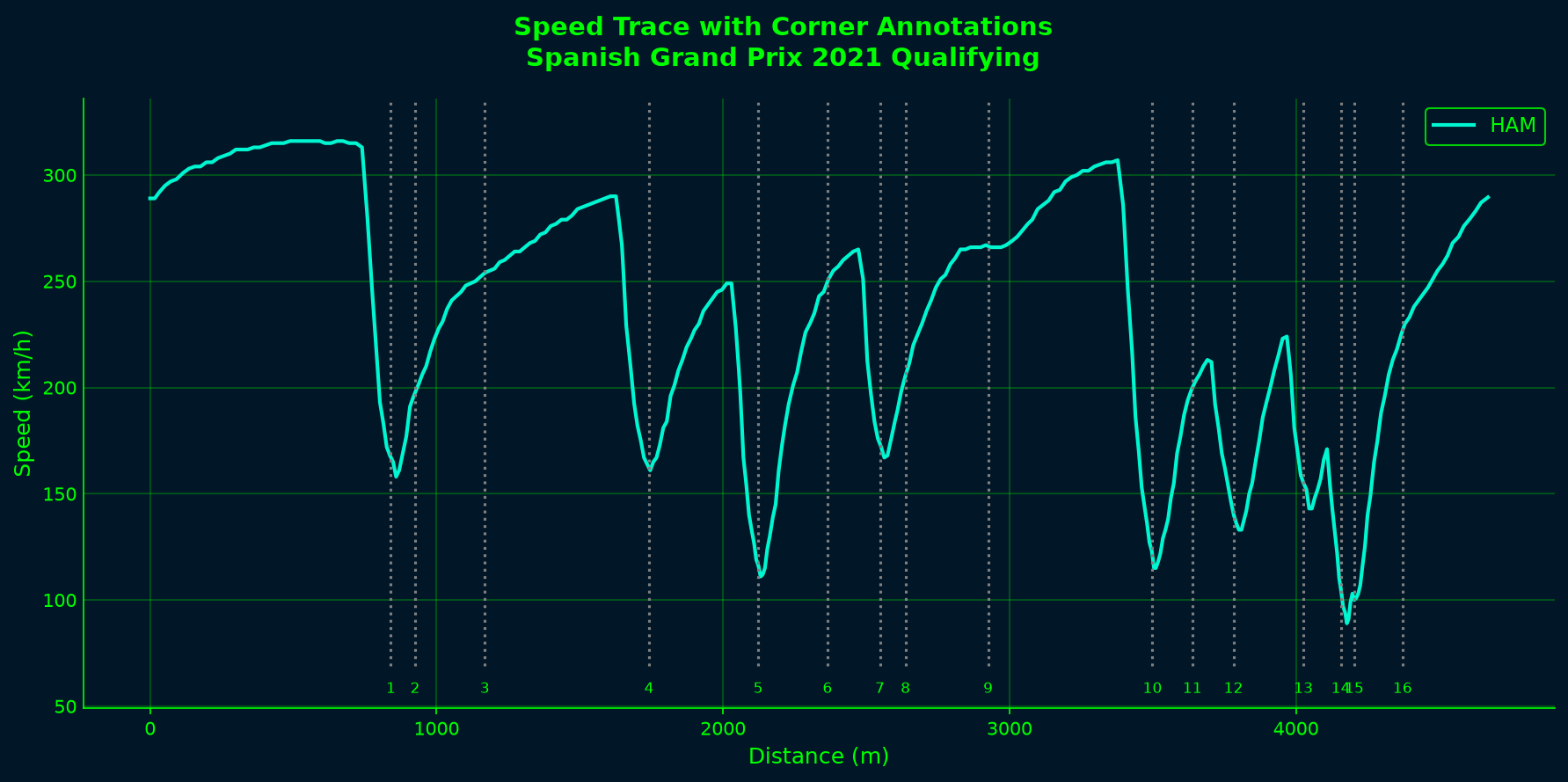
Understanding where speed changes occur on a circuit is crucial for lap analysis. By annotating a speed trace with corner locations, you can quickly identify braking zones, apex speeds, and acceleration patterns at specific corners. Speed trace with corner annotations

Loading the session and data

We’ll analyze the fastest qualifying lap from the 2021 Spanish Grand Prix and overlay corner markers.
import matplotlib.pyplot as plt
import tif1

# Enable plotting support
tif1.plotting.setup_mpl(mpl_timedelta_support=True, color_scheme='fastf1')

# Load qualifying session
session = tif1.get_session(2021, 'Spanish Grand Prix', 'Q')

Getting the fastest lap telemetry

Select the fastest lap and retrieve its telemetry data with distance information.
fastest_lap = session.laps.pick_fastest()
car_data = fastest_lap.get_car_data().add_distance()

Loading circuit information

The circuit info contains corner locations, numbers, and other track-specific data.
circuit_info = session.get_circuit_info()
The circuit_info.corners DataFrame includes:
  • Number: Corner number
  • Letter: Corner letter (for chicanes or complex sections)
  • Distance: Distance from start line in meters
  • Angle: Corner angle
  • X, Y: Track coordinates

Creating the annotated plot

Plot the speed trace and add vertical lines at each corner location.
# Get team color for the driver
team_color = tif1.plotting.get_team_color(fastest_lap['Team'], session=session)

# Create figure
fig, ax = plt.subplots(figsize=(12, 6))
ax.plot(car_data['Distance'], car_data['Speed'],
        color=team_color, label=fastest_lap['Driver'], linewidth=2)

# Draw vertical dotted lines at each corner
v_min = car_data['Speed'].min()
v_max = car_data['Speed'].max()
ax.vlines(x=circuit_info.corners['Distance'], ymin=v_min-20, ymax=v_max+20,
          linestyles='dotted', colors='grey')

# Add corner numbers below the lines
for _, corner in circuit_info.corners.iterrows():
    txt = f"{corner['Number']}{corner['Letter']}"
    ax.text(corner['Distance'], v_min-30, txt,
            va='center_baseline', ha='center', size='small')

ax.set_xlabel('Distance (m)')
ax.set_ylabel('Speed (km/h)')
ax.legend()

# Adjust y-axis to include corner numbers
ax.set_ylim([v_min - 40, v_max + 20])

plt.suptitle(f"Speed Trace with Corner Annotations\n"
             f"{session.event['EventName']} {session.event.year} Qualifying")
plt.show()

Understanding the visualization

The annotated speed trace reveals:
  • Corner entry speeds: Where the speed drops before each corner marker
  • Minimum corner speeds: The lowest point near each corner number
  • Corner exit acceleration: How quickly speed increases after each corner
  • Straight-line performance: Speed plateaus between corners
For example, Turn 1 at Barcelona typically shows a sharp speed drop from ~310 km/h to ~150 km/h, while the high-speed Turn 9 maintains speeds above 250 km/h.

Comparing multiple drivers

You can extend this to compare multiple drivers by plotting additional speed traces:
# Get laps from two drivers
lap1 = session.laps.pick_drivers('VER').pick_fastest()
lap2 = session.laps.pick_drivers('HAM').pick_fastest()

tel1 = lap1.get_car_data().add_distance()
tel2 = lap2.get_car_data().add_distance()

# Plot both with corner annotations
fig, ax = plt.subplots(figsize=(12, 6))

color1 = tif1.plotting.get_team_color(lap1['Team'], session=session)
color2 = tif1.plotting.get_team_color(lap2['Team'], session=session)

ax.plot(tel1['Distance'], tel1['Speed'], color=color1, label=lap1['Driver'], linewidth=2)
ax.plot(tel2['Distance'], tel2['Speed'], color=color2, label=lap2['Driver'], linewidth=2)

# Add corner markers
v_min = min(tel1['Speed'].min(), tel2['Speed'].min())
v_max = max(tel1['Speed'].max(), tel2['Speed'].max())
ax.vlines(x=circuit_info.corners['Distance'], ymin=v_min-20, ymax=v_max+20,
          linestyles='dotted', colors='grey', alpha=0.5)

for _, corner in circuit_info.corners.iterrows():
    txt = f"{corner['Number']}{corner['Letter']}"
    ax.text(corner['Distance'], v_min-30, txt,
            va='center_baseline', ha='center', size='small')

ax.set_xlabel('Distance (m)')
ax.set_ylabel('Speed (km/h)')
ax.legend()
ax.set_ylim([v_min - 40, v_max + 20])

plt.show()

Complete example

import matplotlib.pyplot as plt
import tif1

# Setup
tif1.plotting.setup_mpl(mpl_timedelta_support=True, color_scheme='fastf1')

# Load session
session = tif1.get_session(2021, 'Spanish Grand Prix', 'Q')

# Get fastest lap and telemetry
fastest_lap = session.laps.pick_fastest()
car_data = fastest_lap.get_car_data().add_distance()

# Get circuit info
circuit_info = session.get_circuit_info()

# Get team color
team_color = tif1.plotting.get_team_color(fastest_lap['Team'], session=session)

# Create plot
fig, ax = plt.subplots(figsize=(12, 6))
ax.plot(car_data['Distance'], car_data['Speed'],
        color=team_color, label=fastest_lap['Driver'], linewidth=2)

# Add corner annotations
v_min = car_data['Speed'].min()
v_max = car_data['Speed'].max()
ax.vlines(x=circuit_info.corners['Distance'], ymin=v_min-20, ymax=v_max+20,
          linestyles='dotted', colors='grey')

for _, corner in circuit_info.corners.iterrows():
    txt = f"{corner['Number']}{corner['Letter']}"
    ax.text(corner['Distance'], v_min-30, txt,
            va='center_baseline', ha='center', size='small')

ax.set_xlabel('Distance (m)')
ax.set_ylabel('Speed (km/h)')
ax.legend()
ax.set_ylim([v_min - 40, v_max + 20])

plt.suptitle(f"Speed Trace with Corner Annotations\n"
             f"{session.event['EventName']} {session.event.year} Qualifying")
plt.show()

Next steps

Last modified on March 6, 2026